Alright, so what have I been up to these last 2 weeks? Well I have been working on character hitboxes, more specifically trying to figure out how to export hitbox physics information from Blender into my game. So far I've made absolutely no progress on that front. What I think I'm probably going to do is actually hardcode it into the game for now just so I can get the other parts of my engine working and then try again later when I have fewer points of failure to deal with.
In other news, I discovered this game called Space Station 13 and I'm probably going to shamelessly steal things from it because it solves my problem of how to make my game fun during the alpha. Basically how it works is the game has rounds that last 1-2 hours. At the start of each round everyone gets a random character and job to role play as. During the round random Space Balls like events can occur that you try to survive though. Because of the large verity of things that can occur, no one really knows how a round is going to play out and as a result you end up with rather interesting stories being crated. By adding this as a gamemode to my game I can have a game that's fun to play sooner, the features that would be needed for said gamemode would also be needed for my final game, and I wouldn't have to worry about players getting attached to their characters or worlds because everything will just get reset at the end of the round anyway.
Well, that's it for this post, hopefully for the next one I'll actually have a ragdoll in the game, which probably wouldn't be all that interesting to watch, but it'll be something.
Sunday, May 28, 2017

Monday, May 15, 2017
Progress Update #15
Whoops, completely spaced making a post (that no one will ever read) yesterday. anyway, I have decided the next thing I'll work on for my game will be the animation system. I don't really know how this should work, so I'm kind of making it up as I go along. The first thing I want it to be able to do is ragdoll, I think after I achieve that single actor animations should be fairly simple to implement. But the problem I've run into is ragdoll is a physics based animation and with my physics system and my animation system separate, this would be difficult to achieve. After some thought I realized that physics is a form of animation and should probably be merged into the animation system. This has numerous advantages and will solve a lot of the problems I've been trying to work out and allow all my animations to have physics enabled. Although I've not quite figured out how to translate my animations into something the physics engine understands yet and I strongly suspect I'm going to wind up writing my own physics engine before this game is done.
In other news I'm currently putting the finishing touches on my best drawing yet and have found my old digital camera, so when it's done I intend to post a picture of it to Minds.
Sunday, April 30, 2017
Progress Update #14
So this time I've finished making the memory allocation manager work and have gotten it to generate and unload chunks dynamically around the player (a much more difficult task then it sounds). As for what I'm going to work on next, I'm not sure, my todo list is long. But I've been kind of thinking about the direction I want to go in for the alpha, originally what I was planning on doing was start out building the tutorial area and then move into the actual world a lot closer to the beta when most of the basic systems were in place, but I'm kind of changing my mind on that. It makes more sense to just let everyone into the game world right from the get go and build the tutorial area later. And with that I think I'll end it here, since no one is ever going to read this anyway.
Sunday, April 16, 2017
Progress Update #13
Happy Easter everyone, I'm happy to report for this update that some actual progress was made on the game (although not much). I found myself with some free time and worked on the way memory is allocated for chunks and am nearly done with that. I have also decided that I've been away too long and while my life isn't quite where I need it to be, I'm going to start allocating a bit of my time to work on this game. I have to keep this short because of mandatory family stuff, but hopefully I'll have more progress and something interesting for next time.
Sunday, April 2, 2017
Town Placement AI
Alright, so I'd like to start by announcing that I have created a minds account and can be found at https://www.minds.com/TheWrongHands, I have no idea what I'm going to do with this account, but it's now there for what ever I feel like doing with it. Now for this post I would like to talk about the mechanism I intend to use to place cities in my procedurally generated worlds, but we need to work our way up to that by starting with resource distribution.
In Minecraft the resource distribution is in such a way that that you have a little bit of everything everywhere. By that I mean that if you dig down anywhere your likely to easily find every resource you might need but in small pockets. This is perfect for a game that is primarily about construction and exploration as that anywhere you go you can easily find any resource that you might need to get started, but need to do a bit of exploring to amass the amount of resources needed for large scale construction. On the other hand for an RPG, this isn't so great. For the early game I want to force the player to run around and have to interact with NPC's in order to get the resources they need, while in the late game make the player figure out how to build where they need to instead of giving them the freedom to just build anywhere or in anyway they wish. To achieve this I want to put mine-able resources into large deposits that are big enough that if your can lay claim to one, you won't be needing any more of that particular resource for awhile and infrequent enough that if you just randomly dig down, your unlikely to find anything of value. This will give a reason to build mining villages strategically and incentivize trade between the the player and NPC as well as between NPCs. So with that in mind, village, towns, and cities can't just be placed any where and expect to receive a benefit, which leads us into the topic I was to talk about, AI city placement.
Alright, so the best way to get an AI to do what you want it to assign numbers to things, in this case places. Now while you could calculate things on a per-block level, that kind of resolution is unnecessary, so I'm going to use a chunk unit of measurement that's actual size is unspecified because it's not very important.

In the image above you can see I have made a 16x16 grid and placed a badly drawn village in one of the squares. There is also a yellow circle that represents the distance one can reasonably walk in a day. The optimal place to build another village is somewhere on that yellow line, the reason being that halfway between that line and the village is the furthest away someone who lives at that village can travel and expect to be home before sundown and thus is the furthest away they would be willing to go to farm or gather resources. So villages placed that far apart can optimally use the land without risk of overlap. This also gives travelers a fortified location in which to sleep at night, which benefits trade and the flow of resources. Now, there might be a resource or some other reason to not build perfectly on this line, so a little bit closer or somewhat farther might be acceptable. So now lets apply numbers to this so that an AI can understand it.

Ok, so I have gone though and applied a value to every square based on it's distance from the village and gave that yellow line a value of 300. Now because none of the squares are perfectly on that yellow line, none of them got exactly 300, instead the square with the highest value got 295 and is highlighted in red. I have also given any square too close to the village a negative number so that the AI will never build another village there. So now lets look at a resource.

Ok, so this image just shows the kind of effect I think a resource like copper should have. I gave it a value of 50 and as you can see squares within proximity get the full value after which the values rapidly deteriorate. The reason is that a village build close by or on top can easily harvest the resource, but the further away the village is placed the more difficult it is for them to harvest it until it just gets to be not worth it. So lets look at what happens when we combine the 2 grids.

So now we can see that the best place to build a new village (highlighted in red) is still close to the yellow line but now has the copper resource we just placed within it's range. So now what if we place down another resource, call it iron, and make it 3 times as valuable as copper?

Alright, now as we can see the best place to build a village now is by the iron deposit and that resource was valuable enough to justify building a bit further away from the yellow line. This might have the effect that travelers going between the 2 villages might have to walk in the dark a little bit, but hopefully won't be that big of a deal. Next lets talk about rivers.

Rivers are extremely important for trade, so as you can see in the above image I made them worth 250. I have also given them a much longer reach so that they will naturally pull new villages towards them. So lets see what happens when we combine it all together.

As you can see the river has pulled the best place to build a new village closer to it and further away from that yellow line. Although the village is still close enough to the yellow line that travel shouldn't be an issue, travelers may have to spend an hour or 2 in the dark when going between villages. On the upside, that iron is now much closer to the new village and much easier for it to harvest. The next village built after this one will quite likely be on the bank of that river.
In Minecraft the resource distribution is in such a way that that you have a little bit of everything everywhere. By that I mean that if you dig down anywhere your likely to easily find every resource you might need but in small pockets. This is perfect for a game that is primarily about construction and exploration as that anywhere you go you can easily find any resource that you might need to get started, but need to do a bit of exploring to amass the amount of resources needed for large scale construction. On the other hand for an RPG, this isn't so great. For the early game I want to force the player to run around and have to interact with NPC's in order to get the resources they need, while in the late game make the player figure out how to build where they need to instead of giving them the freedom to just build anywhere or in anyway they wish. To achieve this I want to put mine-able resources into large deposits that are big enough that if your can lay claim to one, you won't be needing any more of that particular resource for awhile and infrequent enough that if you just randomly dig down, your unlikely to find anything of value. This will give a reason to build mining villages strategically and incentivize trade between the the player and NPC as well as between NPCs. So with that in mind, village, towns, and cities can't just be placed any where and expect to receive a benefit, which leads us into the topic I was to talk about, AI city placement.
Alright, so the best way to get an AI to do what you want it to assign numbers to things, in this case places. Now while you could calculate things on a per-block level, that kind of resolution is unnecessary, so I'm going to use a chunk unit of measurement that's actual size is unspecified because it's not very important.

In the image above you can see I have made a 16x16 grid and placed a badly drawn village in one of the squares. There is also a yellow circle that represents the distance one can reasonably walk in a day. The optimal place to build another village is somewhere on that yellow line, the reason being that halfway between that line and the village is the furthest away someone who lives at that village can travel and expect to be home before sundown and thus is the furthest away they would be willing to go to farm or gather resources. So villages placed that far apart can optimally use the land without risk of overlap. This also gives travelers a fortified location in which to sleep at night, which benefits trade and the flow of resources. Now, there might be a resource or some other reason to not build perfectly on this line, so a little bit closer or somewhat farther might be acceptable. So now lets apply numbers to this so that an AI can understand it.

Ok, so I have gone though and applied a value to every square based on it's distance from the village and gave that yellow line a value of 300. Now because none of the squares are perfectly on that yellow line, none of them got exactly 300, instead the square with the highest value got 295 and is highlighted in red. I have also given any square too close to the village a negative number so that the AI will never build another village there. So now lets look at a resource.

Ok, so this image just shows the kind of effect I think a resource like copper should have. I gave it a value of 50 and as you can see squares within proximity get the full value after which the values rapidly deteriorate. The reason is that a village build close by or on top can easily harvest the resource, but the further away the village is placed the more difficult it is for them to harvest it until it just gets to be not worth it. So lets look at what happens when we combine the 2 grids.

So now we can see that the best place to build a new village (highlighted in red) is still close to the yellow line but now has the copper resource we just placed within it's range. So now what if we place down another resource, call it iron, and make it 3 times as valuable as copper?

Alright, now as we can see the best place to build a village now is by the iron deposit and that resource was valuable enough to justify building a bit further away from the yellow line. This might have the effect that travelers going between the 2 villages might have to walk in the dark a little bit, but hopefully won't be that big of a deal. Next lets talk about rivers.
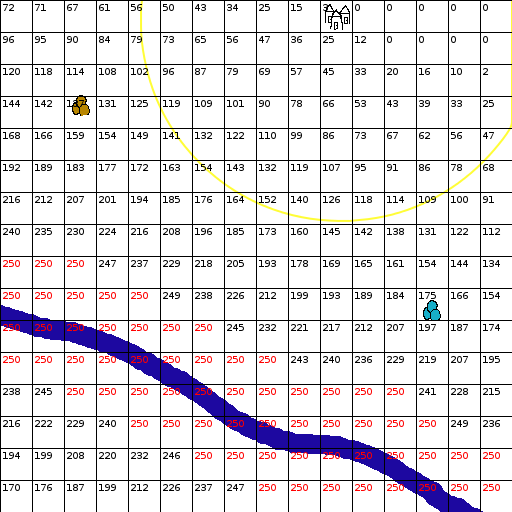
Rivers are extremely important for trade, so as you can see in the above image I made them worth 250. I have also given them a much longer reach so that they will naturally pull new villages towards them. So lets see what happens when we combine it all together.

As you can see the river has pulled the best place to build a new village closer to it and further away from that yellow line. Although the village is still close enough to the yellow line that travel shouldn't be an issue, travelers may have to spend an hour or 2 in the dark when going between villages. On the upside, that iron is now much closer to the new village and much easier for it to harvest. The next village built after this one will quite likely be on the bank of that river.
I'm not sure what more to add to this, I just made up the numbers and rules on the fly, so there is quite likely lots of room for improvement on everything, but this should be enough to give you a rough idea of how I want this to work. For anyone wondering how I calculated and numbered every single square without fellating a 9mm, the answer is I made the following python script for GIMP:
# this is so i don't have to press enter
import math
townD = 200
oreMin = townD / 3
oreMax = townD * 2 / 3
riverMin = townD / 3
riverMax = townD * 2
def render(name, map):
img = gimp.image_list()[0]
# pdb.gimp_selection_none(img)
layer = gimp.Layer(img, name, 512, 512, RGBA_IMAGE, 0, NORMAL_MODE)
img.add_layer(layer, 0)
biggest = 0
for y in range(0, 16):
for x in range(0, 16):
if(map[y][x] > biggest):
biggest = map[y][x]
#couldn't get this to work, but i'll leave it in in-case i need it later
#pdb.gimp_context_swap_colors()
# for y in range(0, 16):
# for x in range(0, 16):
# if(1):#map[y][x] == biggest):
# pdb.gimp_image_select_rectangle(img, 2, x * 32 + 1, y * 32 + 1, 31, 31)
# pdb.gimp_image_select_rectangle(img, 1, x * 32 + 2, y * 32 + 2, 29, 29)
# pdb.gimp_edit_fill(layer, 1)
# pdb.gimp_edit_bucket_fill(layer, 1, 24, 100, 0, 0, x * 32 + 1, y * 32 + 1)
#pdb.gimp_context_swap_colors()
# pdb.gimp_selection_none(img)
for y in range(0, 16):
for x in range(0, 16):
if(map[y][x] == biggest):
pdb.gimp_context_swap_colors()
text = pdb.gimp_text_fontname(img, None, x * 32 + 2, y * 32 + 2, str(int(map[y][x])), -1, 1, 10, 0, 'Sans')
if(map[y][x] == biggest):
pdb.gimp_context_swap_colors()
pdb.gimp_image_merge_down(img, text, 1)
def dis(a, b):
return math.sqrt(math.pow(a[0] - b[0], 2) + math.pow(a[1] - b[1], 2))
def initMap():
map = [[0, 0, 0, 0, 0, 0, 0, 0, 0, 0, 0, 0, 0, 0, 0, 0],
[0, 0, 0, 0, 0, 0, 0, 0, 0, 0, 0, 0, 0, 0, 0, 0],
[0, 0, 0, 0, 0, 0, 0, 0, 0, 0, 0, 0, 0, 0, 0, 0],
[0, 0, 0, 0, 0, 0, 0, 0, 0, 0, 0, 0, 0, 0, 0, 0],
[0, 0, 0, 0, 0, 0, 0, 0, 0, 0, 0, 0, 0, 0, 0, 0],
[0, 0, 0, 0, 0, 0, 0, 0, 0, 0, 0, 0, 0, 0, 0, 0],
[0, 0, 0, 0, 0, 0, 0, 0, 0, 0, 0, 0, 0, 0, 0, 0],
[0, 0, 0, 0, 0, 0, 0, 0, 0, 0, 0, 0, 0, 0, 0, 0],
[0, 0, 0, 0, 0, 0, 0, 0, 0, 0, 0, 0, 0, 0, 0, 0],
[0, 0, 0, 0, 0, 0, 0, 0, 0, 0, 0, 0, 0, 0, 0, 0],
[0, 0, 0, 0, 0, 0, 0, 0, 0, 0, 0, 0, 0, 0, 0, 0],
[0, 0, 0, 0, 0, 0, 0, 0, 0, 0, 0, 0, 0, 0, 0, 0],
[0, 0, 0, 0, 0, 0, 0, 0, 0, 0, 0, 0, 0, 0, 0, 0],
[0, 0, 0, 0, 0, 0, 0, 0, 0, 0, 0, 0, 0, 0, 0, 0],
[0, 0, 0, 0, 0, 0, 0, 0, 0, 0, 0, 0, 0, 0, 0, 0],
[0, 0, 0, 0, 0, 0, 0, 0, 0, 0, 0, 0, 0, 0, 0, 0]]
return map
def calMap(map, rValue, rPos, rule):
for y in range(0, 16):
for x in range(0, 16):
testPos = [x * 32 + 16, y * 32 + 16]
for pos in rPos:
v = rule(testPos, pos, rValue)
if(v < 0 or map[y][x] < 0):
map[y][x] = -1
elif(v > map[y][x]):
map[y][x] = v
def mergeMaps(a, b):
map = initMap()
for y in range(0, 16):
for x in range(0, 16):
if(a[y][x] < 0 or b[y][x] < 0):
map[y][x] = -1
else:
map[y][x] = a[y][x] + b[y][x]
return map
def townRule(testPos, pos, value):
d = dis(testPos, pos)
if(d <= townD * 0.75):
return -1
elif(d < townD):
return max(math.floor(((d - townD * 0.75) * 4 * value) / townD), 0)
else:
return max(math.floor(((townD * 2 - d) * value) / townD), 0)
def oreRule(testPos, pos, value):
d = dis(testPos, pos)
if(d < oreMin):
return value
elif(d > oreMax):
return 0
else:
return max(math.floor(((oreMax - oreMin) - (d - oreMin)) * value / (oreMax - oreMin)), 0)
def riverRule(testPos, pos, value):
d = dis(testPos, pos)
if(d < riverMin):
return value
elif(d > riverMax):
return 0
else:
return max(math.floor(((riverMax - riverMin) - (d - riverMin)) * value / (riverMax - riverMin)), 0)
town = [[341, 21]]
iron = [[433, 309]]
copper = [[80, 108]]
river = [[16, 319], [56, 329], [93, 338], [130, 353], [161, 370], [191, 388], [221, 410], [254, 428], [288, 441], [323, 445], [357, 451], [389, 465], [424, 486], [455, 505]]
townMap = initMap()
copperMap = initMap()
ironMap = initMap()
riverMap = initMap()
calMap(townMap, 300, town, townRule)
calMap(copperMap, 50, copper, oreRule)
calMap(ironMap, 150, iron, oreRule)
calMap(riverMap, 250, river, riverRule)
tc = mergeMaps(townMap, copperMap)
tci = mergeMaps(tc, ironMap)
tcir = mergeMaps(tci, riverMap)
render('town map', townMap)
render('copper map', copperMap)
render('river map', riverMap)
render('tc map', tc)
render('tci map', tci)
render('tcir map', tcir)
# this is so i don't have to press enter
import math
townD = 200
oreMin = townD / 3
oreMax = townD * 2 / 3
riverMin = townD / 3
riverMax = townD * 2
def render(name, map):
img = gimp.image_list()[0]
# pdb.gimp_selection_none(img)
layer = gimp.Layer(img, name, 512, 512, RGBA_IMAGE, 0, NORMAL_MODE)
img.add_layer(layer, 0)
biggest = 0
for y in range(0, 16):
for x in range(0, 16):
if(map[y][x] > biggest):
biggest = map[y][x]
#couldn't get this to work, but i'll leave it in in-case i need it later
#pdb.gimp_context_swap_colors()
# for y in range(0, 16):
# for x in range(0, 16):
# if(1):#map[y][x] == biggest):
# pdb.gimp_image_select_rectangle(img, 2, x * 32 + 1, y * 32 + 1, 31, 31)
# pdb.gimp_image_select_rectangle(img, 1, x * 32 + 2, y * 32 + 2, 29, 29)
# pdb.gimp_edit_fill(layer, 1)
# pdb.gimp_edit_bucket_fill(layer, 1, 24, 100, 0, 0, x * 32 + 1, y * 32 + 1)
#pdb.gimp_context_swap_colors()
# pdb.gimp_selection_none(img)
for y in range(0, 16):
for x in range(0, 16):
if(map[y][x] == biggest):
pdb.gimp_context_swap_colors()
text = pdb.gimp_text_fontname(img, None, x * 32 + 2, y * 32 + 2, str(int(map[y][x])), -1, 1, 10, 0, 'Sans')
if(map[y][x] == biggest):
pdb.gimp_context_swap_colors()
pdb.gimp_image_merge_down(img, text, 1)
def dis(a, b):
return math.sqrt(math.pow(a[0] - b[0], 2) + math.pow(a[1] - b[1], 2))
def initMap():
map = [[0, 0, 0, 0, 0, 0, 0, 0, 0, 0, 0, 0, 0, 0, 0, 0],
[0, 0, 0, 0, 0, 0, 0, 0, 0, 0, 0, 0, 0, 0, 0, 0],
[0, 0, 0, 0, 0, 0, 0, 0, 0, 0, 0, 0, 0, 0, 0, 0],
[0, 0, 0, 0, 0, 0, 0, 0, 0, 0, 0, 0, 0, 0, 0, 0],
[0, 0, 0, 0, 0, 0, 0, 0, 0, 0, 0, 0, 0, 0, 0, 0],
[0, 0, 0, 0, 0, 0, 0, 0, 0, 0, 0, 0, 0, 0, 0, 0],
[0, 0, 0, 0, 0, 0, 0, 0, 0, 0, 0, 0, 0, 0, 0, 0],
[0, 0, 0, 0, 0, 0, 0, 0, 0, 0, 0, 0, 0, 0, 0, 0],
[0, 0, 0, 0, 0, 0, 0, 0, 0, 0, 0, 0, 0, 0, 0, 0],
[0, 0, 0, 0, 0, 0, 0, 0, 0, 0, 0, 0, 0, 0, 0, 0],
[0, 0, 0, 0, 0, 0, 0, 0, 0, 0, 0, 0, 0, 0, 0, 0],
[0, 0, 0, 0, 0, 0, 0, 0, 0, 0, 0, 0, 0, 0, 0, 0],
[0, 0, 0, 0, 0, 0, 0, 0, 0, 0, 0, 0, 0, 0, 0, 0],
[0, 0, 0, 0, 0, 0, 0, 0, 0, 0, 0, 0, 0, 0, 0, 0],
[0, 0, 0, 0, 0, 0, 0, 0, 0, 0, 0, 0, 0, 0, 0, 0],
[0, 0, 0, 0, 0, 0, 0, 0, 0, 0, 0, 0, 0, 0, 0, 0]]
return map
def calMap(map, rValue, rPos, rule):
for y in range(0, 16):
for x in range(0, 16):
testPos = [x * 32 + 16, y * 32 + 16]
for pos in rPos:
v = rule(testPos, pos, rValue)
if(v < 0 or map[y][x] < 0):
map[y][x] = -1
elif(v > map[y][x]):
map[y][x] = v
def mergeMaps(a, b):
map = initMap()
for y in range(0, 16):
for x in range(0, 16):
if(a[y][x] < 0 or b[y][x] < 0):
map[y][x] = -1
else:
map[y][x] = a[y][x] + b[y][x]
return map
def townRule(testPos, pos, value):
d = dis(testPos, pos)
if(d <= townD * 0.75):
return -1
elif(d < townD):
return max(math.floor(((d - townD * 0.75) * 4 * value) / townD), 0)
else:
return max(math.floor(((townD * 2 - d) * value) / townD), 0)
def oreRule(testPos, pos, value):
d = dis(testPos, pos)
if(d < oreMin):
return value
elif(d > oreMax):
return 0
else:
return max(math.floor(((oreMax - oreMin) - (d - oreMin)) * value / (oreMax - oreMin)), 0)
def riverRule(testPos, pos, value):
d = dis(testPos, pos)
if(d < riverMin):
return value
elif(d > riverMax):
return 0
else:
return max(math.floor(((riverMax - riverMin) - (d - riverMin)) * value / (riverMax - riverMin)), 0)
town = [[341, 21]]
iron = [[433, 309]]
copper = [[80, 108]]
river = [[16, 319], [56, 329], [93, 338], [130, 353], [161, 370], [191, 388], [221, 410], [254, 428], [288, 441], [323, 445], [357, 451], [389, 465], [424, 486], [455, 505]]
townMap = initMap()
copperMap = initMap()
ironMap = initMap()
riverMap = initMap()
calMap(townMap, 300, town, townRule)
calMap(copperMap, 50, copper, oreRule)
calMap(ironMap, 150, iron, oreRule)
calMap(riverMap, 250, river, riverRule)
tc = mergeMaps(townMap, copperMap)
tci = mergeMaps(tc, ironMap)
tcir = mergeMaps(tci, riverMap)
render('town map', townMap)
render('copper map', copperMap)
render('river map', riverMap)
render('tc map', tc)
render('tci map', tci)
render('tcir map', tcir)
# this is so i don't have to press enter
Tuesday, March 21, 2017
Dark Times Ahead
I had hoped to be able to keep political stuff out of this since this blog is supposed to be about a game I'm making and contain only fun things, but it appears that the real world isn't going to let me or people like me just have fun. As you may or may not be aware Google has recently caved to the pressure of the perpetually offended and has announced plans to make their platform a haven for the intellectually dishonest, just as Twitter and Facebook have done before them. You might be wondering what this has to do with my project, well Blogger (the site your currently reading this on) is owned and operated by Google. Now I'm small and generally insignificant, so I might be able to just fly under the radar, but as that I intend to add a lot of fun things to my game and as the perpetually offended hate fun, there is a chance that at some point in the future I'll be forced to take this project down.
Thank you for your time, I'm now going to go sit in the corner and rock back and forth creepily for awhile.
Sunday, March 19, 2017
Update #12
I'm afraid I can't write much for this update, an old hand injury of mine is flaring up making it difficult to use the computer (perhaps I should do a bit less faping). Anyway, I'll try to make up for it with my next post by putting in some actual effort and some shitty ms paint drawing.
Subscribe to:
Posts (Atom)