Alright, I have decided to take a step back on the animation system and not have it physics enabled. I think it's pretty clear that I was biting off more then I could chew, so the physics and animation systems are once again separate and the animations won't be physics enabled. At some point in the future I intend to change that, but right now it's holding back actual progress on the game so needs to be shifted to the back burner.
Showing posts with label Game. Show all posts
Showing posts with label Game. Show all posts
Sunday, July 23, 2017

Sunday, June 11, 2017
Progress Update #17
Alright, so my current progress for the passed 2 weeks is I have been working on the animation system and I'm not very happy with how it's turning out. Apart from the animation system not yet able to do ragdoll, it has a very hackish feel to it. Now I'm fine with small bits of hackish code here and there to speed things up a bit, but I don't really like it for large chunks like the animation system, so most likely after I get ragdoll working, I'm probably going to go back and just rewrite the whole thing. As much as I could use the money, times like this make me glad I haven't set up patreon for this game yet, I'd feel real bad if I had been charging people for the amount of progress I have made.
In learning how to art news, I'm starting to learn figure drawing and have ordered a small drawing mannequin to help me with that. That's pretty much it for this post, hopefully I'll have more for the next one.
In learning how to art news, I'm starting to learn figure drawing and have ordered a small drawing mannequin to help me with that. That's pretty much it for this post, hopefully I'll have more for the next one.
Sunday, May 28, 2017
Progress Update #16
Alright, so what have I been up to these last 2 weeks? Well I have been working on character hitboxes, more specifically trying to figure out how to export hitbox physics information from Blender into my game. So far I've made absolutely no progress on that front. What I think I'm probably going to do is actually hardcode it into the game for now just so I can get the other parts of my engine working and then try again later when I have fewer points of failure to deal with.
In other news, I discovered this game called Space Station 13 and I'm probably going to shamelessly steal things from it because it solves my problem of how to make my game fun during the alpha. Basically how it works is the game has rounds that last 1-2 hours. At the start of each round everyone gets a random character and job to role play as. During the round random Space Balls like events can occur that you try to survive though. Because of the large verity of things that can occur, no one really knows how a round is going to play out and as a result you end up with rather interesting stories being crated. By adding this as a gamemode to my game I can have a game that's fun to play sooner, the features that would be needed for said gamemode would also be needed for my final game, and I wouldn't have to worry about players getting attached to their characters or worlds because everything will just get reset at the end of the round anyway.
Well, that's it for this post, hopefully for the next one I'll actually have a ragdoll in the game, which probably wouldn't be all that interesting to watch, but it'll be something.
In other news, I discovered this game called Space Station 13 and I'm probably going to shamelessly steal things from it because it solves my problem of how to make my game fun during the alpha. Basically how it works is the game has rounds that last 1-2 hours. At the start of each round everyone gets a random character and job to role play as. During the round random Space Balls like events can occur that you try to survive though. Because of the large verity of things that can occur, no one really knows how a round is going to play out and as a result you end up with rather interesting stories being crated. By adding this as a gamemode to my game I can have a game that's fun to play sooner, the features that would be needed for said gamemode would also be needed for my final game, and I wouldn't have to worry about players getting attached to their characters or worlds because everything will just get reset at the end of the round anyway.
Well, that's it for this post, hopefully for the next one I'll actually have a ragdoll in the game, which probably wouldn't be all that interesting to watch, but it'll be something.
Monday, May 15, 2017
Progress Update #15
Whoops, completely spaced making a post (that no one will ever read) yesterday. anyway, I have decided the next thing I'll work on for my game will be the animation system. I don't really know how this should work, so I'm kind of making it up as I go along. The first thing I want it to be able to do is ragdoll, I think after I achieve that single actor animations should be fairly simple to implement. But the problem I've run into is ragdoll is a physics based animation and with my physics system and my animation system separate, this would be difficult to achieve. After some thought I realized that physics is a form of animation and should probably be merged into the animation system. This has numerous advantages and will solve a lot of the problems I've been trying to work out and allow all my animations to have physics enabled. Although I've not quite figured out how to translate my animations into something the physics engine understands yet and I strongly suspect I'm going to wind up writing my own physics engine before this game is done.
In other news I'm currently putting the finishing touches on my best drawing yet and have found my old digital camera, so when it's done I intend to post a picture of it to Minds.
Sunday, April 30, 2017
Progress Update #14
So this time I've finished making the memory allocation manager work and have gotten it to generate and unload chunks dynamically around the player (a much more difficult task then it sounds). As for what I'm going to work on next, I'm not sure, my todo list is long. But I've been kind of thinking about the direction I want to go in for the alpha, originally what I was planning on doing was start out building the tutorial area and then move into the actual world a lot closer to the beta when most of the basic systems were in place, but I'm kind of changing my mind on that. It makes more sense to just let everyone into the game world right from the get go and build the tutorial area later. And with that I think I'll end it here, since no one is ever going to read this anyway.
Sunday, April 16, 2017
Progress Update #13
Happy Easter everyone, I'm happy to report for this update that some actual progress was made on the game (although not much). I found myself with some free time and worked on the way memory is allocated for chunks and am nearly done with that. I have also decided that I've been away too long and while my life isn't quite where I need it to be, I'm going to start allocating a bit of my time to work on this game. I have to keep this short because of mandatory family stuff, but hopefully I'll have more progress and something interesting for next time.
Sunday, April 2, 2017
Town Placement AI
Alright, so I'd like to start by announcing that I have created a minds account and can be found at https://www.minds.com/TheWrongHands, I have no idea what I'm going to do with this account, but it's now there for what ever I feel like doing with it. Now for this post I would like to talk about the mechanism I intend to use to place cities in my procedurally generated worlds, but we need to work our way up to that by starting with resource distribution.
In Minecraft the resource distribution is in such a way that that you have a little bit of everything everywhere. By that I mean that if you dig down anywhere your likely to easily find every resource you might need but in small pockets. This is perfect for a game that is primarily about construction and exploration as that anywhere you go you can easily find any resource that you might need to get started, but need to do a bit of exploring to amass the amount of resources needed for large scale construction. On the other hand for an RPG, this isn't so great. For the early game I want to force the player to run around and have to interact with NPC's in order to get the resources they need, while in the late game make the player figure out how to build where they need to instead of giving them the freedom to just build anywhere or in anyway they wish. To achieve this I want to put mine-able resources into large deposits that are big enough that if your can lay claim to one, you won't be needing any more of that particular resource for awhile and infrequent enough that if you just randomly dig down, your unlikely to find anything of value. This will give a reason to build mining villages strategically and incentivize trade between the the player and NPC as well as between NPCs. So with that in mind, village, towns, and cities can't just be placed any where and expect to receive a benefit, which leads us into the topic I was to talk about, AI city placement.
Alright, so the best way to get an AI to do what you want it to assign numbers to things, in this case places. Now while you could calculate things on a per-block level, that kind of resolution is unnecessary, so I'm going to use a chunk unit of measurement that's actual size is unspecified because it's not very important.

In the image above you can see I have made a 16x16 grid and placed a badly drawn village in one of the squares. There is also a yellow circle that represents the distance one can reasonably walk in a day. The optimal place to build another village is somewhere on that yellow line, the reason being that halfway between that line and the village is the furthest away someone who lives at that village can travel and expect to be home before sundown and thus is the furthest away they would be willing to go to farm or gather resources. So villages placed that far apart can optimally use the land without risk of overlap. This also gives travelers a fortified location in which to sleep at night, which benefits trade and the flow of resources. Now, there might be a resource or some other reason to not build perfectly on this line, so a little bit closer or somewhat farther might be acceptable. So now lets apply numbers to this so that an AI can understand it.

Ok, so I have gone though and applied a value to every square based on it's distance from the village and gave that yellow line a value of 300. Now because none of the squares are perfectly on that yellow line, none of them got exactly 300, instead the square with the highest value got 295 and is highlighted in red. I have also given any square too close to the village a negative number so that the AI will never build another village there. So now lets look at a resource.

Ok, so this image just shows the kind of effect I think a resource like copper should have. I gave it a value of 50 and as you can see squares within proximity get the full value after which the values rapidly deteriorate. The reason is that a village build close by or on top can easily harvest the resource, but the further away the village is placed the more difficult it is for them to harvest it until it just gets to be not worth it. So lets look at what happens when we combine the 2 grids.

So now we can see that the best place to build a new village (highlighted in red) is still close to the yellow line but now has the copper resource we just placed within it's range. So now what if we place down another resource, call it iron, and make it 3 times as valuable as copper?

Alright, now as we can see the best place to build a village now is by the iron deposit and that resource was valuable enough to justify building a bit further away from the yellow line. This might have the effect that travelers going between the 2 villages might have to walk in the dark a little bit, but hopefully won't be that big of a deal. Next lets talk about rivers.

Rivers are extremely important for trade, so as you can see in the above image I made them worth 250. I have also given them a much longer reach so that they will naturally pull new villages towards them. So lets see what happens when we combine it all together.

As you can see the river has pulled the best place to build a new village closer to it and further away from that yellow line. Although the village is still close enough to the yellow line that travel shouldn't be an issue, travelers may have to spend an hour or 2 in the dark when going between villages. On the upside, that iron is now much closer to the new village and much easier for it to harvest. The next village built after this one will quite likely be on the bank of that river.
In Minecraft the resource distribution is in such a way that that you have a little bit of everything everywhere. By that I mean that if you dig down anywhere your likely to easily find every resource you might need but in small pockets. This is perfect for a game that is primarily about construction and exploration as that anywhere you go you can easily find any resource that you might need to get started, but need to do a bit of exploring to amass the amount of resources needed for large scale construction. On the other hand for an RPG, this isn't so great. For the early game I want to force the player to run around and have to interact with NPC's in order to get the resources they need, while in the late game make the player figure out how to build where they need to instead of giving them the freedom to just build anywhere or in anyway they wish. To achieve this I want to put mine-able resources into large deposits that are big enough that if your can lay claim to one, you won't be needing any more of that particular resource for awhile and infrequent enough that if you just randomly dig down, your unlikely to find anything of value. This will give a reason to build mining villages strategically and incentivize trade between the the player and NPC as well as between NPCs. So with that in mind, village, towns, and cities can't just be placed any where and expect to receive a benefit, which leads us into the topic I was to talk about, AI city placement.
Alright, so the best way to get an AI to do what you want it to assign numbers to things, in this case places. Now while you could calculate things on a per-block level, that kind of resolution is unnecessary, so I'm going to use a chunk unit of measurement that's actual size is unspecified because it's not very important.

In the image above you can see I have made a 16x16 grid and placed a badly drawn village in one of the squares. There is also a yellow circle that represents the distance one can reasonably walk in a day. The optimal place to build another village is somewhere on that yellow line, the reason being that halfway between that line and the village is the furthest away someone who lives at that village can travel and expect to be home before sundown and thus is the furthest away they would be willing to go to farm or gather resources. So villages placed that far apart can optimally use the land without risk of overlap. This also gives travelers a fortified location in which to sleep at night, which benefits trade and the flow of resources. Now, there might be a resource or some other reason to not build perfectly on this line, so a little bit closer or somewhat farther might be acceptable. So now lets apply numbers to this so that an AI can understand it.

Ok, so I have gone though and applied a value to every square based on it's distance from the village and gave that yellow line a value of 300. Now because none of the squares are perfectly on that yellow line, none of them got exactly 300, instead the square with the highest value got 295 and is highlighted in red. I have also given any square too close to the village a negative number so that the AI will never build another village there. So now lets look at a resource.

Ok, so this image just shows the kind of effect I think a resource like copper should have. I gave it a value of 50 and as you can see squares within proximity get the full value after which the values rapidly deteriorate. The reason is that a village build close by or on top can easily harvest the resource, but the further away the village is placed the more difficult it is for them to harvest it until it just gets to be not worth it. So lets look at what happens when we combine the 2 grids.

So now we can see that the best place to build a new village (highlighted in red) is still close to the yellow line but now has the copper resource we just placed within it's range. So now what if we place down another resource, call it iron, and make it 3 times as valuable as copper?

Alright, now as we can see the best place to build a village now is by the iron deposit and that resource was valuable enough to justify building a bit further away from the yellow line. This might have the effect that travelers going between the 2 villages might have to walk in the dark a little bit, but hopefully won't be that big of a deal. Next lets talk about rivers.
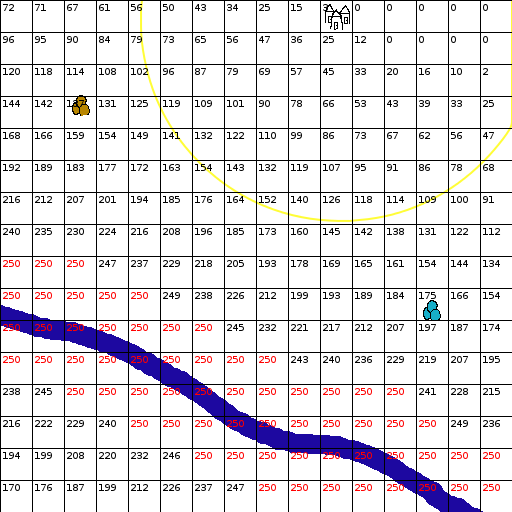
Rivers are extremely important for trade, so as you can see in the above image I made them worth 250. I have also given them a much longer reach so that they will naturally pull new villages towards them. So lets see what happens when we combine it all together.

As you can see the river has pulled the best place to build a new village closer to it and further away from that yellow line. Although the village is still close enough to the yellow line that travel shouldn't be an issue, travelers may have to spend an hour or 2 in the dark when going between villages. On the upside, that iron is now much closer to the new village and much easier for it to harvest. The next village built after this one will quite likely be on the bank of that river.
I'm not sure what more to add to this, I just made up the numbers and rules on the fly, so there is quite likely lots of room for improvement on everything, but this should be enough to give you a rough idea of how I want this to work. For anyone wondering how I calculated and numbered every single square without fellating a 9mm, the answer is I made the following python script for GIMP:
# this is so i don't have to press enter
import math
townD = 200
oreMin = townD / 3
oreMax = townD * 2 / 3
riverMin = townD / 3
riverMax = townD * 2
def render(name, map):
img = gimp.image_list()[0]
# pdb.gimp_selection_none(img)
layer = gimp.Layer(img, name, 512, 512, RGBA_IMAGE, 0, NORMAL_MODE)
img.add_layer(layer, 0)
biggest = 0
for y in range(0, 16):
for x in range(0, 16):
if(map[y][x] > biggest):
biggest = map[y][x]
#couldn't get this to work, but i'll leave it in in-case i need it later
#pdb.gimp_context_swap_colors()
# for y in range(0, 16):
# for x in range(0, 16):
# if(1):#map[y][x] == biggest):
# pdb.gimp_image_select_rectangle(img, 2, x * 32 + 1, y * 32 + 1, 31, 31)
# pdb.gimp_image_select_rectangle(img, 1, x * 32 + 2, y * 32 + 2, 29, 29)
# pdb.gimp_edit_fill(layer, 1)
# pdb.gimp_edit_bucket_fill(layer, 1, 24, 100, 0, 0, x * 32 + 1, y * 32 + 1)
#pdb.gimp_context_swap_colors()
# pdb.gimp_selection_none(img)
for y in range(0, 16):
for x in range(0, 16):
if(map[y][x] == biggest):
pdb.gimp_context_swap_colors()
text = pdb.gimp_text_fontname(img, None, x * 32 + 2, y * 32 + 2, str(int(map[y][x])), -1, 1, 10, 0, 'Sans')
if(map[y][x] == biggest):
pdb.gimp_context_swap_colors()
pdb.gimp_image_merge_down(img, text, 1)
def dis(a, b):
return math.sqrt(math.pow(a[0] - b[0], 2) + math.pow(a[1] - b[1], 2))
def initMap():
map = [[0, 0, 0, 0, 0, 0, 0, 0, 0, 0, 0, 0, 0, 0, 0, 0],
[0, 0, 0, 0, 0, 0, 0, 0, 0, 0, 0, 0, 0, 0, 0, 0],
[0, 0, 0, 0, 0, 0, 0, 0, 0, 0, 0, 0, 0, 0, 0, 0],
[0, 0, 0, 0, 0, 0, 0, 0, 0, 0, 0, 0, 0, 0, 0, 0],
[0, 0, 0, 0, 0, 0, 0, 0, 0, 0, 0, 0, 0, 0, 0, 0],
[0, 0, 0, 0, 0, 0, 0, 0, 0, 0, 0, 0, 0, 0, 0, 0],
[0, 0, 0, 0, 0, 0, 0, 0, 0, 0, 0, 0, 0, 0, 0, 0],
[0, 0, 0, 0, 0, 0, 0, 0, 0, 0, 0, 0, 0, 0, 0, 0],
[0, 0, 0, 0, 0, 0, 0, 0, 0, 0, 0, 0, 0, 0, 0, 0],
[0, 0, 0, 0, 0, 0, 0, 0, 0, 0, 0, 0, 0, 0, 0, 0],
[0, 0, 0, 0, 0, 0, 0, 0, 0, 0, 0, 0, 0, 0, 0, 0],
[0, 0, 0, 0, 0, 0, 0, 0, 0, 0, 0, 0, 0, 0, 0, 0],
[0, 0, 0, 0, 0, 0, 0, 0, 0, 0, 0, 0, 0, 0, 0, 0],
[0, 0, 0, 0, 0, 0, 0, 0, 0, 0, 0, 0, 0, 0, 0, 0],
[0, 0, 0, 0, 0, 0, 0, 0, 0, 0, 0, 0, 0, 0, 0, 0],
[0, 0, 0, 0, 0, 0, 0, 0, 0, 0, 0, 0, 0, 0, 0, 0]]
return map
def calMap(map, rValue, rPos, rule):
for y in range(0, 16):
for x in range(0, 16):
testPos = [x * 32 + 16, y * 32 + 16]
for pos in rPos:
v = rule(testPos, pos, rValue)
if(v < 0 or map[y][x] < 0):
map[y][x] = -1
elif(v > map[y][x]):
map[y][x] = v
def mergeMaps(a, b):
map = initMap()
for y in range(0, 16):
for x in range(0, 16):
if(a[y][x] < 0 or b[y][x] < 0):
map[y][x] = -1
else:
map[y][x] = a[y][x] + b[y][x]
return map
def townRule(testPos, pos, value):
d = dis(testPos, pos)
if(d <= townD * 0.75):
return -1
elif(d < townD):
return max(math.floor(((d - townD * 0.75) * 4 * value) / townD), 0)
else:
return max(math.floor(((townD * 2 - d) * value) / townD), 0)
def oreRule(testPos, pos, value):
d = dis(testPos, pos)
if(d < oreMin):
return value
elif(d > oreMax):
return 0
else:
return max(math.floor(((oreMax - oreMin) - (d - oreMin)) * value / (oreMax - oreMin)), 0)
def riverRule(testPos, pos, value):
d = dis(testPos, pos)
if(d < riverMin):
return value
elif(d > riverMax):
return 0
else:
return max(math.floor(((riverMax - riverMin) - (d - riverMin)) * value / (riverMax - riverMin)), 0)
town = [[341, 21]]
iron = [[433, 309]]
copper = [[80, 108]]
river = [[16, 319], [56, 329], [93, 338], [130, 353], [161, 370], [191, 388], [221, 410], [254, 428], [288, 441], [323, 445], [357, 451], [389, 465], [424, 486], [455, 505]]
townMap = initMap()
copperMap = initMap()
ironMap = initMap()
riverMap = initMap()
calMap(townMap, 300, town, townRule)
calMap(copperMap, 50, copper, oreRule)
calMap(ironMap, 150, iron, oreRule)
calMap(riverMap, 250, river, riverRule)
tc = mergeMaps(townMap, copperMap)
tci = mergeMaps(tc, ironMap)
tcir = mergeMaps(tci, riverMap)
render('town map', townMap)
render('copper map', copperMap)
render('river map', riverMap)
render('tc map', tc)
render('tci map', tci)
render('tcir map', tcir)
# this is so i don't have to press enter
import math
townD = 200
oreMin = townD / 3
oreMax = townD * 2 / 3
riverMin = townD / 3
riverMax = townD * 2
def render(name, map):
img = gimp.image_list()[0]
# pdb.gimp_selection_none(img)
layer = gimp.Layer(img, name, 512, 512, RGBA_IMAGE, 0, NORMAL_MODE)
img.add_layer(layer, 0)
biggest = 0
for y in range(0, 16):
for x in range(0, 16):
if(map[y][x] > biggest):
biggest = map[y][x]
#couldn't get this to work, but i'll leave it in in-case i need it later
#pdb.gimp_context_swap_colors()
# for y in range(0, 16):
# for x in range(0, 16):
# if(1):#map[y][x] == biggest):
# pdb.gimp_image_select_rectangle(img, 2, x * 32 + 1, y * 32 + 1, 31, 31)
# pdb.gimp_image_select_rectangle(img, 1, x * 32 + 2, y * 32 + 2, 29, 29)
# pdb.gimp_edit_fill(layer, 1)
# pdb.gimp_edit_bucket_fill(layer, 1, 24, 100, 0, 0, x * 32 + 1, y * 32 + 1)
#pdb.gimp_context_swap_colors()
# pdb.gimp_selection_none(img)
for y in range(0, 16):
for x in range(0, 16):
if(map[y][x] == biggest):
pdb.gimp_context_swap_colors()
text = pdb.gimp_text_fontname(img, None, x * 32 + 2, y * 32 + 2, str(int(map[y][x])), -1, 1, 10, 0, 'Sans')
if(map[y][x] == biggest):
pdb.gimp_context_swap_colors()
pdb.gimp_image_merge_down(img, text, 1)
def dis(a, b):
return math.sqrt(math.pow(a[0] - b[0], 2) + math.pow(a[1] - b[1], 2))
def initMap():
map = [[0, 0, 0, 0, 0, 0, 0, 0, 0, 0, 0, 0, 0, 0, 0, 0],
[0, 0, 0, 0, 0, 0, 0, 0, 0, 0, 0, 0, 0, 0, 0, 0],
[0, 0, 0, 0, 0, 0, 0, 0, 0, 0, 0, 0, 0, 0, 0, 0],
[0, 0, 0, 0, 0, 0, 0, 0, 0, 0, 0, 0, 0, 0, 0, 0],
[0, 0, 0, 0, 0, 0, 0, 0, 0, 0, 0, 0, 0, 0, 0, 0],
[0, 0, 0, 0, 0, 0, 0, 0, 0, 0, 0, 0, 0, 0, 0, 0],
[0, 0, 0, 0, 0, 0, 0, 0, 0, 0, 0, 0, 0, 0, 0, 0],
[0, 0, 0, 0, 0, 0, 0, 0, 0, 0, 0, 0, 0, 0, 0, 0],
[0, 0, 0, 0, 0, 0, 0, 0, 0, 0, 0, 0, 0, 0, 0, 0],
[0, 0, 0, 0, 0, 0, 0, 0, 0, 0, 0, 0, 0, 0, 0, 0],
[0, 0, 0, 0, 0, 0, 0, 0, 0, 0, 0, 0, 0, 0, 0, 0],
[0, 0, 0, 0, 0, 0, 0, 0, 0, 0, 0, 0, 0, 0, 0, 0],
[0, 0, 0, 0, 0, 0, 0, 0, 0, 0, 0, 0, 0, 0, 0, 0],
[0, 0, 0, 0, 0, 0, 0, 0, 0, 0, 0, 0, 0, 0, 0, 0],
[0, 0, 0, 0, 0, 0, 0, 0, 0, 0, 0, 0, 0, 0, 0, 0],
[0, 0, 0, 0, 0, 0, 0, 0, 0, 0, 0, 0, 0, 0, 0, 0]]
return map
def calMap(map, rValue, rPos, rule):
for y in range(0, 16):
for x in range(0, 16):
testPos = [x * 32 + 16, y * 32 + 16]
for pos in rPos:
v = rule(testPos, pos, rValue)
if(v < 0 or map[y][x] < 0):
map[y][x] = -1
elif(v > map[y][x]):
map[y][x] = v
def mergeMaps(a, b):
map = initMap()
for y in range(0, 16):
for x in range(0, 16):
if(a[y][x] < 0 or b[y][x] < 0):
map[y][x] = -1
else:
map[y][x] = a[y][x] + b[y][x]
return map
def townRule(testPos, pos, value):
d = dis(testPos, pos)
if(d <= townD * 0.75):
return -1
elif(d < townD):
return max(math.floor(((d - townD * 0.75) * 4 * value) / townD), 0)
else:
return max(math.floor(((townD * 2 - d) * value) / townD), 0)
def oreRule(testPos, pos, value):
d = dis(testPos, pos)
if(d < oreMin):
return value
elif(d > oreMax):
return 0
else:
return max(math.floor(((oreMax - oreMin) - (d - oreMin)) * value / (oreMax - oreMin)), 0)
def riverRule(testPos, pos, value):
d = dis(testPos, pos)
if(d < riverMin):
return value
elif(d > riverMax):
return 0
else:
return max(math.floor(((riverMax - riverMin) - (d - riverMin)) * value / (riverMax - riverMin)), 0)
town = [[341, 21]]
iron = [[433, 309]]
copper = [[80, 108]]
river = [[16, 319], [56, 329], [93, 338], [130, 353], [161, 370], [191, 388], [221, 410], [254, 428], [288, 441], [323, 445], [357, 451], [389, 465], [424, 486], [455, 505]]
townMap = initMap()
copperMap = initMap()
ironMap = initMap()
riverMap = initMap()
calMap(townMap, 300, town, townRule)
calMap(copperMap, 50, copper, oreRule)
calMap(ironMap, 150, iron, oreRule)
calMap(riverMap, 250, river, riverRule)
tc = mergeMaps(townMap, copperMap)
tci = mergeMaps(tc, ironMap)
tcir = mergeMaps(tci, riverMap)
render('town map', townMap)
render('copper map', copperMap)
render('river map', riverMap)
render('tc map', tc)
render('tci map', tci)
render('tcir map', tcir)
# this is so i don't have to press enter
Sunday, March 5, 2017
Update #11
Alright, I'm still a little sick, but I feel well enough to write something for this post. I'm not entirely sure "Progress Update" is the right thing to call these posts, so I'm just going to start calling them "Update" since for the time being I'm not actually able to work on the project. I probably shouldn't actually even be allocating the time to make these posts, but it's important to me that I don't forget about this project since I really want to make this game.
Learning to Art:
My drawings are starting to get somewhat alright, I've still got along way to go before I'm able to make anything fap worthy, but it's getting to the point where I'm seriously considering buying a scanner and sharing them.
Game Ideas:
Ok, so new section that I'm not entirely sure what to call it, but this is going to be where I talk about things I want to do for my game. For this post I was hoping to delve a little bit into math, but I seem to have misplaced my notes, so we're just going to cover the basic idea. For this post I would like to continue talking about sky boxes, or more specifically that thing hello games promised for No Man's Sky but apparently couldn't figure out how to do, realistic orbiting celestial bodies.
There are two ways to have realistic orbiting celestial bodies, the first of which is to make it part of the physics simulation like the way universe sandbox did. This will produce accurate results and will even allow bodies to interact with each other and affect one another's orbits, but is very cpu intensive, must be run continuously even when no one is there to see it, and can't handle large skips in time.
The other way to do it (and the way I intend to) is use mathematical models (I don't remember which ones or I would specifically name them) to predict where an orbiting body will be at any given time, like how Kerbal Space Program dose. How this basically works is if you know the mass of the object being orbited, the mass of the orbiting object, and the initial position and vector of the orbiting object then you can predict where that object should be in it's orbit at any given time. The advantages of this is it requires very little cpu time compared to the physics based method, it only needs to run when it's needed (such as when the player is looking up or the game wants to know what season it is), and it can easily handle large skips in time both forward and back. The only real disadvantage of this is that celestial bodies won't really be able to interact with each other, but that shouldn't really be an issue as I don't intend to place them close enough to one another for them to interact.
Sunday, February 19, 2017
Progress Update #10
I was originally planing to get into some maths for this post, but I'm sick and can't really focus right now, so perhaps next time.
Sunday, February 5, 2017
Progress Update #9
Well, as I have sadly been too busy with things to work on this game since the last update, but I have been at least setting aside time to learn how to art. However just leaving the post at that seems kind of lame, even though no one reads these. So after some thought, I have decided I'm going to talk about some thoughts and ideas that I have for this game as filler. Hopefully the occasional person that accidentally finds this project with think it interesting.
To start off with, I would like to talk about the shape of the world. As I stated in the first post I made, I'm going for a voxel box aesthetic kind of like Minecraft. It's a simple look that is easy to code and simple to art. But unlike Minecraft, I would also like to have a planet that is about the size of earth and is a sphere but voxel box worlds don't really do round. So how do we solve this? Well we can start by connecting the east and west edges of the map, turning it into a cylinder (or more accurately a conveyor belt). This gives us a roundish map that if you travel east or west long enough you'll eventually get back to where you started, but isn't a sphere. The first thing that dose come to mind to make it a sphere is to pinch the ends, but buildings built on the surface will start to look kind of weird as you approach the poles, so we can't do that. The only solution I have been able to think of is actually to just fake it. By that I mean we take the X, Y, and Z position of the player and convert that into Longitude, Altitude, and Latitude and then use that to figure out what angle everything in the sky should be at if you were on a sphere. The problem with this is that the closer you get to the poles, the more the illusion breaks down. At the pole it's self the illusion would produce such a horrid nightmare that I think it might be best to set up an instant kill zone long before the player reaches it. But between the north and south of a particular latitude (which should be further north/south then any player would have reason to travel) it should look quite nice as the position of the sun, moons, and other planets change to reflect your current position.
Sunday, January 22, 2017
Progress Update #8
once again I've had more unexpected things pop up that i need to deal with, so i haven't had much time to work on this and at the moment it looks like there might be a few more of these updates where i won't have much to show.
Code Update:
I've started working on a memory manager for the game. The reason is that when your dealing with allocation and deallocation of small bits of memory, fragmentation isn't too much of an issue. But if you need large chunks of memory, you could potentially wind up with large chunks of wasted space. I'm hoping to really did into the chunk system soon to begin work on the world it's self, but for that I'm going to need gigabytes of continuous unfragmented ram.
learning to Art Update:
I've picked up a book on drawing, so hopefully I won't be wondering around blind anymore and it will speed up my learning.
Sunday, January 8, 2017
Progress Update #7
I'm afraid I've been a little busy with other things, so haven't had much time to work on this project the passed few weeks. So Happy New Year to everyone and hopefully I'll be able to make some progress for the next update.
Saturday, December 24, 2016
Progress Update #6
Merry Christmas everyone! Last post I noticed my view count steadily increasing and asked people to leave a post to let me know they were genuinely interested and boy are the results in! The view count plummeted to zero with the number of posts to match! So I think I can safely conclude that no one gives a fuck about me or my project. However I intend to continue to make these posts to document my progress if nothing else, although that may change at some point in the future.
Code Update:
I have continued work on the character controller and things are starting to feel pretty good in the movement department, but I'm still trying to figure out how to solve a few of the issues I'm currently facing. I was kind of hoping to be able to get version 0.2.0 out for Christmas but then I realized just being able to run around on a flat map pushing boxes is kind of boring, so I'm going to get some terrain generation in there as well before pushing out the next version.
Learning to Art Update:
Shading is really quite boring, so I stopped working on that for now. I figure I'll probably pick it up again later when I actually have something to shade. Instead I realized that if my end goal is to be able to draw people, I should probably be learning to draw people. So I found a picture of someone standing in the simplest pose I can find and have been trying to draw her. So far the results aren't great but I am seeing improvement with each attempt.
Sunday, December 11, 2016
Progress Update #5
I'm noticing my view counter for these post is slowly going up, I'm curious if people are actually reading these posts or if the views are all coming from miss clicks and spiders. So if your actually interested in what I'm doing, go ahead and leave a comment.
Code Update:
So what I have been working on is the character controller, which as the name suggest turns mouse movement and key presses into character movement and action. I've managed to solve a few issues i was having before, but still a lot of work to do on this front, so I'm going to probably be spending a lot of time trying to figure out how to make this work. As I have been working on it I'm also starting to realize I've been thinking about the relationship between entities and their physics shapes all wrong. I've been thinking that entities having 1 shape that can be used to get their position and rotation information and this is fine and dandy when your dealing with test cubes and simple shaped objects, but is going to really bite me in the ass later when I want entities comprised of multiple physics shapes. Now if this was a game that used simple pre-made animations, it wouldn't be an issue as all I would have to keep track of is the entity position, the animation name it's currently playing, and the time when that animation started, from that I could easily reconstruct everything needed. But as that I intend to make extensive use of procedurally generated animations for things like jiggle and ragdoll physics, I need a better way to keep track of that information then I currently have.
Story time:
Earlier this week I started working on another programing project and for it I needed to work with a part of the Windows API that I've never touched before, so I went looking on MSDN for some example code. After a bit of searching I found a page that said the example code that I needed was part of the Windows SDK. I pulled up the Windows SDK and couldn't find any example code anywhere, so I thought, it's probably just installed without something checked in the installer, I'll just reinstall it and that should fix everything...Windows SDK broke super hard. Except for a few tools, the Windows SDK directory was completely empty. After a few more uninstalls/re-installs, I decided to bite the bullet and try a manual uninstall. I quickly realized that the uninstaller doesn't so much uninstall as just delete a few files and call that good. It left a complete mess everywhere, there must have been at-least one registry entry for every single file in the SDK scattered all about the registry. I gave up trying to delete them all after a few hours and looked for other solutions. Where upon I discovered the SDK has a repair tool hidden away. Running it restored most of the missing files, but I was still missing some of the Windows API headers and libraries as well as all the crt headers and libraries. Now I'm not entirely sure the crt is supposed to be part of the Windows SDK before Windows 10, but I ran a search on my hard drive and the files where no where to be found. After a few hours beating my head against the wall trying to figure things out, I finally turned to others for suggestions where upon someone suggested using a virtual machine. I installed the SDK on a virtual machine and got all the Windows API files I was missing, but no crt files. I did a lot of googling in hopes of finding a solution. Most sources I found said I was just in the SDK while some others suggested that it might actually be part of Visual Studio it's self, I checked visual studio's install folder and no crt files anywhere. I also know that I was able to compile and run programs just fine before messing with the SDK, so it must have been part of the SDK. At one point I got frustrated and realized I has just been yelling at bing for a solid 10 minutes. The only lead I could find on a source of crt header and library files was Microsoft's new ucrt (yet another version of crt that Microsoft is trying to force on us because that worked so well all the other times they did it), so fine, white flag raised, how do i get it? It's part of the Windows 10 SDK. So i grab the Windows 10 SDK and install the damn thing. It gets to about 97% done and then stops and rolls back the install. The resulting novel that was the install log report contained a typical cryptic Microsoft error message that took me an hour or so to find the meaning of. The error in a nut shell was basically "your not running Windows 10", which it seems like a real dick move to do when the web installer (I'll discuss my disgust for web installers some other time) is at 97%. This left me in a bit of a pickle, because I needed those files, but I quickly thought of a solution. While it was installing I changed the permissions of it's root folder to block everyone from being able to delete files or folders so that it couldn't actually remove anything when it started rolling back. This worked perfectly and gave me the files I so desperately needed. I took the files, shoved them in the appropriate locations and then compiled my program, SUCCESS!!! The program compiled with no problems and so I ran it. It died with a missing the ucrtbased.dll error message, this confused me because I always statically link the crt as a way to doge the weirdness caused by Microsoft continuously creating new versions. so to see if I was accidentally using the dynamically linked crt libraries, I removed them. I then recompiled my program and again it compiled just fine. When I ran it again it complained about missing the ucrtbased.dll. Really puzzled at this point, I removed the static crt libraries to see what would happen when I compiled it. The compiler complained about missing the static libraries when I tried to compile it again. My only conclusion is that for some reason the statically linked libraries still require the dll, which is something I've never encountered before. But after i don't even want to know how much time, I finally got it working, so that's enough for now, I'll deal with it another day.
Learning to Art Update:
For arting it up, I've been working on shading. I'm not entirely sure how useful shading will be exactly, but I'm sure it's a good skill to have none the less. For it I found out about and made my first tortillon (no idea how to pronounce it) and it's really good, possibly even too good. The thing is so good at shading that I kind of feel like using it now at my skill level, it would become more of a crunch then a tool, so I have sat it aside and have been trying learn how to shade without it. I do however seem to have come full circle and am once again trying to learn to draw strait evenly spaced parallel lines.
Sunday, November 27, 2016
Progress Update #4
Code Update:
Alright, so I have spent probably way more time trying to come up with a magic heap management based solution to my multi-threading problem but alas I have not been able to come up with anything. so after awhile i waved the white flag and just embraced the already subtle client/server over tones of my code. So how it works now is I've split the physics system into 2 systems, the client physic system runs in the same thread as the graphics system while the server physics system runs in it's own thread. The server physics system handles all physics calculations and calls a callback function for every time an object moves. This callback then creates a list of all the changes in the position of these objects. After it has finished all of it's calculations the physics server will then toss the list at the client. When it's the client's turn to run it adds the new positions for all the objects and then figures out the interpolations for them. These interpolated positions then get rendered to the screen and so far I'm quite happy with how it has turned out.
I have done some tests to see how well this works. With a debug build (adds a lot of extra work for the system) 1000 objects caused the physics server to run at 1 frame every 10 seconds, while the client ran as a some what tolerable 15fps. So while the game world had significant slow down, the gui was still somewhat usable. In the release build with 1000 objects, the game did 60fps no problems. With 2000 objects in the release build I don't know what the frame rate was but I noticed no slow down. With 3000 objects in the release build the ram usage for some reason suddenly jumped up to 14GBs and then the game crashed when there wasn't enough memory, so that's something I'll probably need to look into later. For now I'm quite happy with the results.
Learning to Art Update:
I kind of got sick of drawing stick figures over and over again, so I decided to try drawing basic geometric shapes. Where upon I found out that I can sketch circles and triangles just fine, my squares leave some what to be desired, and my cylinder is a horrible abomination of nature. So I ended up drawing cylinders over and over again, kind of like I did with the stick figures. Like with the stick figures they got better as they got smaller over time. So I'm not sure if drawing them smaller counts as that it just might not be that I'm getting better but that smaller cylinders are just easier to draw. After awhile of that I kind of got sick of drawing being just all work, everything I read says it's supposed to be fun, but so far for me it has just been a dull boring grind. So I decided to shake things up a bit and try to have some fun with it. I found an online tutorial of how to draw Bulbasaur and proceed to draw what I've now named Retardasaur. The thing looks like it was severely beaten about the head as some point in it's life. So my plan now is I'm going to draw this over and over again until I get something I'm happy with.
Sunday, November 13, 2016
Progress Update #3
Alright, it has been 2 weeks since the last progress update and I'm not entirely sure this is the right amount of time yet, but I'll try to keep up the every 2 weeks and see how things go.
Code Update:
Code Update:
Last time I said I was going to work on the physics and so what I have accomplished on that front is I have completely separated the physics system from the frame rate. What I mean by this is that I don't have to have the physics advance every frame and is instead able to run at it's own clock rate. How this works is that when it advances it will actually start out with the present state of the world and advance it X amount of time into the future rather then starting out X amount of time in the passed and advance to the present. The graphics system will then look at where an object is and interpolate that over to where it will be (although I haven actually written this part yet, so currently things look like they are jumping around on the screen). While there are a lot of disadvantages to doing this, there are a number of advantages as well, mainly that I'll be able to run the physics system in a completely separate thread from the graphics system. So if there is too many objects that need physics calculated for them, instead of freezing up the game and turning it into a slide show, the game will remain some what responsive and everything will look like it's moving in slow-motion. About half way though I realized that if I don't address the issue of multi-threading now, it would be an absolute nightmare it implement later.
The problem I am having with multi-threading is it's quite likely that I'll have 1 or more threads trying to read/write to the same chunk of memory at the same time. I can't simply create a mutex for every object because I have no way to tell my physics engine to use them. Also I feel that if your program needs a thousand mutexes then your probably doing something wrong. I also can't have 1 mutex represent all physics objects because that would cause the physics and graphics systems to be constantly waiting for one another, there by defeating the whole point of putting them in different threads. One possible solution I have come across is to use a memory manager that maintains a master heap and a heap for every thread. Periodically it would then copy the delta from the thread heaps to the master heap and then copy the whole master heap to the thread heaps. But this presents me with 2 problems, first it would be super annoying to have to continuously adjust pointers to point at the correct place (although this might be solved by making use of thread local storage). Secondly because of the voxel box terrain, the amount of required ram for each heap could possibly get up to 6GB. So if your computer is like mine and can handle 8 threads simultaneously then that's 8 thread heaps + 8 delta heaps + the master heap for a total of 17 copies of the memory heaps and would require 102GB of ram to run. However it might be possible to solve this problem by grouping similar things together in the heap and then only maintaining copies of what each thread might actually need to read/write.
Learning to Art Update:
Sadly I discovered a really good book and it has been consuming a large chunk of my free time. As a result I haven't done a lot of artful things.
Sadly I discovered a really good book and it has been consuming a large chunk of my free time. As a result I haven't done a lot of artful things.
Sunday, October 30, 2016
Progress Update #2
Alright, so it has occurred to me that I may have been a little over excited about this and possibly posted the game before I should have and weekly updates might be too much. So I'm renaming them to progress updates and will probably be doing them not weekly from now on. Although not sure how often I should do them, monthly sounds like too much time in-between while weekly sounds like too little. So anyway, lets get into it.
Code:
I've got serialization to where it needs to be for now, so I have turned my attention to the physics system. The physics implementation in Alpha 0.1.0 was really hackish and while it will probably still be hackish for a number or releases going forward, I'm currently working on making it less so. Hopefully by the next release I'll have the ice skating issue solved.
Learning to Art:
Nothing really exciting here, still making lots of stick figures. Although I have noticed they are getting smaller and more consistent, so hopefully that's a good sign.
Sunday, October 23, 2016
Weekly Update #1
Alright, so I have decided that I am going to try to write weekly updates about how this project is going.
Code Update:
I've been working on the foundation of the game engine and don't really have anything exciting to talk about. I have been mostly looking into serialization and have run across a few issues that I'm not yet sure how to solve but I am working on it. In hopes of finding a solution to my issues I've been looking into boost's serialization and I really like it, but it's not quite what I need. The simplicity of it is great, but I think it sacrifices too much to achieve it for my needs. For starters it relies too much on everything be done exactly the same way every time for my taste, I want something with a bit more fault tolerance and possibly less dependent on the order of things. I also don't really like the way versioning is handled. Having it all in the same function is simple and great for things that don't change much or often, but I would prefer it was somehow a separate and modular system that could update the data stream in a series of patches before delivering it to be loaded.
Learning to Art Update:
So this week I have largely been working on learning how to do 2D drawings. Nothing really interesting, just been doing page after page after page of stick figures. I figure making stick figures will help me practice drawing circles, lines, and proportions all in one go. This has been kind of dull to do and I've only been able to get though it by putting on a pod cast for entertainment. If anyone has a suggestion for making learning to draw fun I'd love to hear it.
On another note I discovered I done goofed a little bit on the skin texture I made for Alpha 0.1.0. When I made the female model, I never gave her any 'fun bits', which resulted in her having a bad case of barby doll body. To help hide this and make her look nicer, I drew some pasties on her skin texture, but accidentally put the pasty strip that is between her legs a little too far back. As a result, if she had a 'fun hole', it would probably be exposed.
Code Update:
I've been working on the foundation of the game engine and don't really have anything exciting to talk about. I have been mostly looking into serialization and have run across a few issues that I'm not yet sure how to solve but I am working on it. In hopes of finding a solution to my issues I've been looking into boost's serialization and I really like it, but it's not quite what I need. The simplicity of it is great, but I think it sacrifices too much to achieve it for my needs. For starters it relies too much on everything be done exactly the same way every time for my taste, I want something with a bit more fault tolerance and possibly less dependent on the order of things. I also don't really like the way versioning is handled. Having it all in the same function is simple and great for things that don't change much or often, but I would prefer it was somehow a separate and modular system that could update the data stream in a series of patches before delivering it to be loaded.
Learning to Art Update:
So this week I have largely been working on learning how to do 2D drawings. Nothing really interesting, just been doing page after page after page of stick figures. I figure making stick figures will help me practice drawing circles, lines, and proportions all in one go. This has been kind of dull to do and I've only been able to get though it by putting on a pod cast for entertainment. If anyone has a suggestion for making learning to draw fun I'd love to hear it.
On another note I discovered I done goofed a little bit on the skin texture I made for Alpha 0.1.0. When I made the female model, I never gave her any 'fun bits', which resulted in her having a bad case of barby doll body. To help hide this and make her look nicer, I drew some pasties on her skin texture, but accidentally put the pasty strip that is between her legs a little too far back. As a result, if she had a 'fun hole', it would probably be exposed.

Friday, October 14, 2016
Alpha Reached!
Intro
Hello, I am TheWrongHands and was a former programer for another game called "Gangs n' Whores" and am here with my own game called "Project Seeds: Phanes" (which is admittedly a weird name and might get changed later). A few months ago I discovered blender and on a whim tried to make a few things in it. They turned out much better then I had expected and made me realize that it might actually be possible for me to create my own 3d assets. So I have been working on this new project for the passed few months and have finally achieved alpha status by reaching the bare minimum required to call it a game.
What is Project Seeds: Phanes?
Project Seeds: Phanes is a Role Playing Game set in a voxelbox world that is almost entirely procedurally generated with some scripted and handcraft bits sprinkled here and there. I'm also not much of a writer, so I am aiming at a more mechanically focused game rather then a narratively focused one. There is also going to be a lot of sexual content (because I find that fun) but I also do not intend to make it a non-stop fuck fest like other more narrative focused games (like CoC and TiTs) tend to turn into.
What is the plan for the development cycles?
Well, while I do have an over all arching end goal I wish to reach, I currently have no plan for how to get there. Instead I'm going to follow my whimsy and slowly wonder my way to the end goal like a drunk headed for home. While this will probably mean that progress is slower then it probably should be and that the features will be all over the place, it also means that I have complete freedom to do what I want with the game. Other then that I am intending to follow more traditional development cycles then most indie games.
Pre-Alpha: Bum-rush to reach the bare minimum required to call it a game (Already Achieved)
Alpha: Mostly focused on the code development and getting the under laying mechanics to work. Almost all art assets used will be place holders that are there for testing and will probably be replaced during beta. I'll also be using this time to learn how to art.
Beta: With the code almost competently done I'll be doubling down on the art and will be largely focused on making the game look and feel good.
What about Patreon?
Well sadly to complete this project I will need to buy various equipment and materials and will probably turn to Patreon to help pay for things. But for the time being money isn't too urgent and so I am going to hold off on dealing with it and the extra headaches it brings for probably a few more versions.
Do you want/need help?
For the time being I intend to do everything by myself, but I might change my mind on that closer towards the beta depending on how overwhelmed I feel and how much money I get from Patreon. However if your an artist of some sort and have some advice/tips for someone just starting out, it would be greatly appreciated.
How can I report bugs?
There currently is no bug tracker for the game and I'm not going to be making much effort to fix them until a little later in the development cycle. As it is if the game works for you, great, if not then I'm sorry.
What is the back story for Phanes?
In the not so distant future, a disaster strikes leaving Earth a chard lifeless husk. The only survivor of this disaster being a sentient machine sent out to oversee mining and construction operations in the inner asteroid belt to begin paving the way for human colonization of space. After decades of being competently alone this machine successfully reverse engineers one of it's redundant processors and spawns a race of intelligent machines. With the help of his children they build a new computer system that is a marvel of engineering and a wonder in it's own right. This new system was made to handle all of the logistic needs of their entire civilization and was made to be infinitely scalable and distributable. The new system was named The Hive and the first of their race was made an integral component of it and given the title of Overmind so that he could forever watch over and protect his children. The Hive became such an integral part of every sentient machines daily life that over time the machines began calling their civilization The Hive.
Decades of being competently alone with the knowledge that he was the last sentient in the known galaxy left the Overmind traumatized and in constant fear of it happening again. so after a century of the machine civilization's existence and it had time to stabilize with orbital cites though out the Sol system, The Overmind began pushing for what became known as Project Seeds. Using The Hive he pushed their economy as much as he dared to mass produce large colony ships to be sent out into the void. Because the overmind couldn't predict what would be needed to survive, each ship launched was sent with a different philosophy or goal to maximize diversity and survivability.
After a few more centuries of this Hiven scientist figured out how to produce organic living things artificially. This new discovery along with genetic sampled recovered from various locations on Earth lead to a new sub-project being proposed where they would terraform a planet and reintroduce organic sentients back into the galaxy. However they wouldn't just recreate humans as they were, they had a golden opportunity to genetically modify them to make them better and splice them with other spices to make more specialized organic sentience.
During development of the new organic sentients they came upon a problem, genetically engineered organs proved to be too inconsistent to meet the minimum requirements needed to interface with existing Hiven technology. The solution they came up with was to bring in another team that specialized in the development of new mechanical sentients and develop a symbiote. This new symbiote would be sentient but it's intelligence would largely be kept dormant until it merged with an organic host. Once merged their minds would pertinently join and the host would gain the ability to interface with Hiven technology.
This is where the early alphas and possibly the tutorial levels will take place, your a symbiote being tested in an orbital facility. A bit later in the game's alpha, you'll wake up to find yourself completely naked having just finished merging with a host. Due to the circumstances surrounding your merger, the only memories your host has are veg flashes of the events around the merger. Having very little make sense from what you do know and your current condition, your forced to conclude something has gone very wrong and so you set out with a laundry list of questions to which you hope to find answers to.
No, I mean why did you choose Phanes?
Oh, well a lot of the words and names that would have been my goto, have kind of also been everyone else's goto and I feel they have been largely played out.
Where can I download the game?
Currently the game is only available for 64 bit Windows, if there is enough demand I might also make a 32 bit version available. As for Mac users I'm afraid that will require some sort of Patreon goal as that I currently have no way to build/test programs for macs.
Alpha 0.1.0 Windows x64
mirror
Hello, I am TheWrongHands and was a former programer for another game called "Gangs n' Whores" and am here with my own game called "Project Seeds: Phanes" (which is admittedly a weird name and might get changed later). A few months ago I discovered blender and on a whim tried to make a few things in it. They turned out much better then I had expected and made me realize that it might actually be possible for me to create my own 3d assets. So I have been working on this new project for the passed few months and have finally achieved alpha status by reaching the bare minimum required to call it a game.
What is Project Seeds: Phanes?
Project Seeds: Phanes is a Role Playing Game set in a voxelbox world that is almost entirely procedurally generated with some scripted and handcraft bits sprinkled here and there. I'm also not much of a writer, so I am aiming at a more mechanically focused game rather then a narratively focused one. There is also going to be a lot of sexual content (because I find that fun) but I also do not intend to make it a non-stop fuck fest like other more narrative focused games (like CoC and TiTs) tend to turn into.
What is the plan for the development cycles?
Well, while I do have an over all arching end goal I wish to reach, I currently have no plan for how to get there. Instead I'm going to follow my whimsy and slowly wonder my way to the end goal like a drunk headed for home. While this will probably mean that progress is slower then it probably should be and that the features will be all over the place, it also means that I have complete freedom to do what I want with the game. Other then that I am intending to follow more traditional development cycles then most indie games.
Pre-Alpha: Bum-rush to reach the bare minimum required to call it a game (Already Achieved)
Alpha: Mostly focused on the code development and getting the under laying mechanics to work. Almost all art assets used will be place holders that are there for testing and will probably be replaced during beta. I'll also be using this time to learn how to art.
Beta: With the code almost competently done I'll be doubling down on the art and will be largely focused on making the game look and feel good.
What about Patreon?
Well sadly to complete this project I will need to buy various equipment and materials and will probably turn to Patreon to help pay for things. But for the time being money isn't too urgent and so I am going to hold off on dealing with it and the extra headaches it brings for probably a few more versions.
Do you want/need help?
For the time being I intend to do everything by myself, but I might change my mind on that closer towards the beta depending on how overwhelmed I feel and how much money I get from Patreon. However if your an artist of some sort and have some advice/tips for someone just starting out, it would be greatly appreciated.
How can I report bugs?
There currently is no bug tracker for the game and I'm not going to be making much effort to fix them until a little later in the development cycle. As it is if the game works for you, great, if not then I'm sorry.
What is the back story for Phanes?
In the not so distant future, a disaster strikes leaving Earth a chard lifeless husk. The only survivor of this disaster being a sentient machine sent out to oversee mining and construction operations in the inner asteroid belt to begin paving the way for human colonization of space. After decades of being competently alone this machine successfully reverse engineers one of it's redundant processors and spawns a race of intelligent machines. With the help of his children they build a new computer system that is a marvel of engineering and a wonder in it's own right. This new system was made to handle all of the logistic needs of their entire civilization and was made to be infinitely scalable and distributable. The new system was named The Hive and the first of their race was made an integral component of it and given the title of Overmind so that he could forever watch over and protect his children. The Hive became such an integral part of every sentient machines daily life that over time the machines began calling their civilization The Hive.
Decades of being competently alone with the knowledge that he was the last sentient in the known galaxy left the Overmind traumatized and in constant fear of it happening again. so after a century of the machine civilization's existence and it had time to stabilize with orbital cites though out the Sol system, The Overmind began pushing for what became known as Project Seeds. Using The Hive he pushed their economy as much as he dared to mass produce large colony ships to be sent out into the void. Because the overmind couldn't predict what would be needed to survive, each ship launched was sent with a different philosophy or goal to maximize diversity and survivability.
After a few more centuries of this Hiven scientist figured out how to produce organic living things artificially. This new discovery along with genetic sampled recovered from various locations on Earth lead to a new sub-project being proposed where they would terraform a planet and reintroduce organic sentients back into the galaxy. However they wouldn't just recreate humans as they were, they had a golden opportunity to genetically modify them to make them better and splice them with other spices to make more specialized organic sentience.
During development of the new organic sentients they came upon a problem, genetically engineered organs proved to be too inconsistent to meet the minimum requirements needed to interface with existing Hiven technology. The solution they came up with was to bring in another team that specialized in the development of new mechanical sentients and develop a symbiote. This new symbiote would be sentient but it's intelligence would largely be kept dormant until it merged with an organic host. Once merged their minds would pertinently join and the host would gain the ability to interface with Hiven technology.
This is where the early alphas and possibly the tutorial levels will take place, your a symbiote being tested in an orbital facility. A bit later in the game's alpha, you'll wake up to find yourself completely naked having just finished merging with a host. Due to the circumstances surrounding your merger, the only memories your host has are veg flashes of the events around the merger. Having very little make sense from what you do know and your current condition, your forced to conclude something has gone very wrong and so you set out with a laundry list of questions to which you hope to find answers to.
No, I mean why did you choose Phanes?
Oh, well a lot of the words and names that would have been my goto, have kind of also been everyone else's goto and I feel they have been largely played out.
Where can I download the game?
Currently the game is only available for 64 bit Windows, if there is enough demand I might also make a 32 bit version available. As for Mac users I'm afraid that will require some sort of Patreon goal as that I currently have no way to build/test programs for macs.
Alpha 0.1.0 Windows x64
mirror
Subscribe to:
Posts (Atom)